How the AI works
What the AI does, and what it does not.
Short, plain answers. For the legal detail, read the privacy policy.
From input to saved record
You log
A photo, your voice or a sentence.
AI names foods
It lists the foods and guesses the amounts. It is never asked for calories.
Database matches
Each food is looked up in USDA or Taiwan FDA data for its calories.
You confirm
Change, swap or remove anything, then save.
1. The AI recognizes foods and guesses portions
When you log with a photo, your voice or a sentence, the AI reads it and returns a short list: the foods it found and roughly how much of each. That is the only job it is given. It is not asked for calories.
2. Calories come from nutrition databases
Each food on that list is matched to a nutrition database: USDA FoodData Central (U.S. Department of Agriculture) or the Taiwan FDA food composition database. Barcodes are looked up in USDA FoodData Central and Open Food Facts. The calorie number you see is the database value multiplied by the amount.
3. You review everything
Before anything is saved you see each item. You can change the food, change the amount, remove an item (and undo it), or start again. A photo of a mixed dish, a dark photo or an unusual portion is more likely to need a correction.
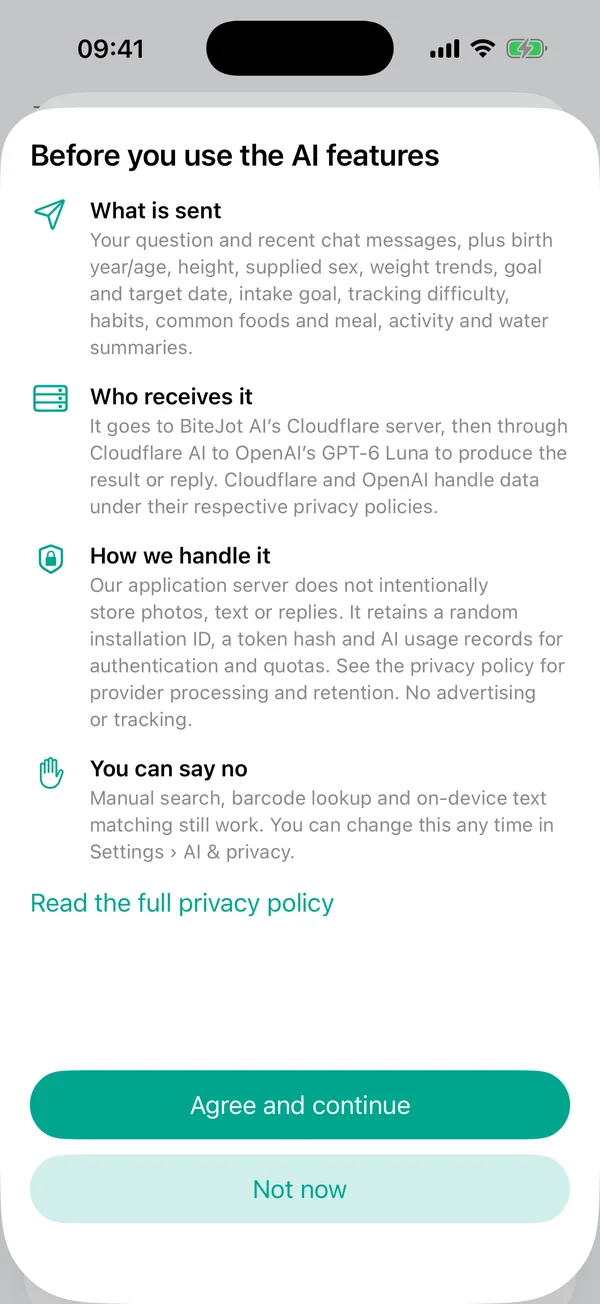
4. What goes where
| What | Where it goes |
|---|---|
| Your meals, weights, activity and history | Stored on your phone. There is no account. |
| A meal photo, typed or spoken food text, a coach question (only after you agree to AI) | Sent over HTTPS to our server on Cloudflare, which passes it to OpenAI's GPT-6 Luna model through Cloudflare's AI service to produce the answer. |
| Voice | Your phone's speech recognition turns speech into text. Only the text is sent, not the audio. Apple may process speech on its servers depending on your device and settings. |
| Coach questions | Also include a short summary of your profile and recent records (for example age, height, weight trend and goal), not a full list of every meal. |
| Search words and barcode digits | Sent to our server and, for barcodes, on to USDA FoodData Central and Open Food Facts. |
Our own server does not intentionally keep your photos, text or the AI's replies. It keeps a random installation ID, a token hash and AI usage counts, which are needed for sign-in-free access and daily limits. We have turned off AI Gateway logging and turned on Cloudflare's Zero Data Retention setting. That reduces what is kept, but it is not a promise that no provider keeps any record: OpenAI states that API data is not used to train its models unless a customer opts in, and that abuse-monitoring logs can be kept for up to 30 days. The privacy policy has the full, current wording.
In Settings, under Server data, you can copy your installation ID or delete the server records for this installation.
5. What can go wrong
- Misrecognized foods. The AI can confuse look-alikes. That is why you review each item.
- Wrong portions. A photo cannot show weight. Treat amounts as estimates and adjust them.
- Databases are averages. A restaurant dish or a home recipe can differ from the database entry.
- No internet, no AI. Manual search and your history still work.
- Not available everywhere. AI features are not available in mainland China, Hong Kong and Macao.
6. What BiteJot AI is not
It is not a medical device and does not give medical advice, diagnosis or treatment. It is for adults aged 18 and over, and it does not build a weight-loss plan for younger users. If you are pregnant, have or have had an eating disorder, have a medical condition, or are unsure what is right for you, talk to a health professional. The app avoids very low calorie targets and extreme restriction.
7. Control
You can turn AI off any time in Settings and still search, scan barcodes and log by hand. Questions or requests: hardwalker1212@gmail.com.